Saturday, August 19. 2017
 I think most techies would agree that the biggest innovation in recent years has been the introduction of the solid state drive. Rather than a clunky spinning disc, it uses a microchip, so obviously it's going to be blazingly faster. And, simply because there are no moving parts, it's a lot less subject to failure. I think most techies would agree that the biggest innovation in recent years has been the introduction of the solid state drive. Rather than a clunky spinning disc, it uses a microchip, so obviously it's going to be blazingly faster. And, simply because there are no moving parts, it's a lot less subject to failure.
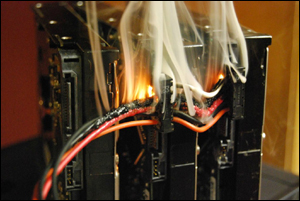
Pic: Result from using incorrect wiring with the new fast hard drives.
Actually, I should correct something I said up above. I said a digital drive is "blazingly" faster. I probably should have said screamingly faster. I mean, there's really no comparison, as you'll see in the figures below the fold.
Continue reading "Doc's Computin' Tips: The solid state drive"
Saturday, July 15. 2017
 While I haven't posted a lot of articles on my site since I went on hiatus, I have posted a few choice goodies, so I thought I'd list them out. While I haven't posted a lot of articles on my site since I went on hiatus, I have posted a few choice goodies, so I thought I'd list them out.
Note: If the videos don't play using Firefox, read my comment to Mark. Firefox is decidedly Flash-unfriendly these days and often deactivates
the plugin if it's outdated.
Fans of NCIS
While I obviously didn't watch any TV while I was in Colorado, the first thing I did when I got back to civilization was catch up on 'NCIS' and 'NCIS: New Orleans'. The last NCIS post I made here was when we found out that everybody's favorite ex-Mossad assassin was leaving the show.
And then the delightful Ellie Bishop arrived. Quickly becoming an ardent Bishoprophile, I made a number of posts highlighting her. The last NCIS post I made here was titled 'Tonight's The Night'. The next one on the list continues the saga. The story of everyone's favorite blonde ex-NSA analyst begins with 'An Insidious Plot Revealed', which is about as me a post as there can be.
Web Vids
All in all, I think I have a pretty decent collection of short videos grabbed from the web over the past 20 years. I've posted a number of them here. Continuing the collection are 'Web Vids IV' and 'The Music Is The Message 2', both available here.
More fun and games below the fold. (dudes, wait'll you see the 'For Guys Only' section, heh)
Continue reading "Recent Doc posts"
Wednesday, July 5. 2017
This will be a two-part post. I'm going to cover two Internet-related topics. If you have a bunch of siblings, kids and in-laws, definitely read the second part.
 Avoiding The Domain Havesters Avoiding The Domain Havesters
Pic: artist's conception of average domain harvester
If you ever, ever, think you might want to start up a blog or web site one day using your name (or future business name) as the domain, you need to do it ASAP, then hold onto it with both hands. The problem is that once a domain expires, the domain harvesters will grab it up, and then they'll charge you a pretty penny if you want to buy it back. I've seen them ask for upwards of $3,000.
And you can see why they do it. If you want to open Mary Brown's Boutique, and desperately want the 'marybrownsboutique.com" name, well, you'll probably be willing to shell out some bucks for it. And that'll be especially true since you'll then be able to write it off on your income tax as a business expense. In your mind's eye, that might be enough to justify it.
So, the answer is to get the rascal registered now, then desperately hold onto it until the day you want to use it. I'd suggest you use BlueHost, the web hosting company I've been using for 15 years. The domain will only cost you $3.95/mo, which beats the heck out of paying some domain harvester their blood money down the road. And BlueHost will help you keep the domain, either by billing you automatically every year, or notifying you by email when it's due.
Some tips on grabbing a unique domain:
— If you're looking to register "jimcrawford.com", but it's already been taken, try using your middle initial, your full middle name, or perhaps "james" instead of "jim".
— You can use hyphens, so if all the above are taken, try "jim-crawford.com".
— If you're opening a fun blog site and "coolestblogintown.com" is taken, try adding "the" to the beginning, or "a", "another", "yet another", "my", "your", etc.
As for using domain suffixes other than ".com", I tend to recommend against it. If someone's trying to remember your domain name from memory, and it finally comes to them, they're going to use ".com" just by default. And if someone else already has your domain but with a ".com" (which is likely, or you would have used it), that's where they'll end up.
BTW, there's no web site involved. All you're buying is the domain. Come the day you want to use it, that'll be when you either hire a webmaster or do it yourself using the remarkable WordPress software and my easy step-by-step guide.
Here's the link to BlueHost. The sign-up process is pretty simple. At one point you'll make up a BlueHost password. Scribble it and the domain into a Notepad file and keep that rascal safe. You might also print out a copy and stick it in some file folder.
Below the fold, the wonderful adventure of opening a family blog. If you've got a bunch of siblings, kids and in-laws, it's a great experience for everyone involved.
Continue reading "Of Domain Harvesters + The Family Blog"
Saturday, July 1. 2017
Side note: I still haven't found a place to live. If you didn't catch my about-to-be-homeless post, it's here. I had a couple of promising leads in the comments, but they both flamed out. I have a couple more I'm still pursuing, but if you have something offer, that would be very appreciated.
 First off, for those of you using windows 7, I have a fairly comprehensive Win7 site here. The 'Setup' page is really somethin' else. It solves a number of pesky problems, like those annoying thumbnails that pop up when the pointer's over an entry on the Task Bar. First off, for those of you using windows 7, I have a fairly comprehensive Win7 site here. The 'Setup' page is really somethin' else. It solves a number of pesky problems, like those annoying thumbnails that pop up when the pointer's over an entry on the Task Bar.
So, let's start with the Start Menu. If you long for the older style of Windows Start Menu, where everything stays in its proper place and the sub-folders can all be organized by type of program, then grab Classic Shell. The setup page for it is here. He's constantly updating the program, so perhaps not everything will line up with the instructions, but it should be close.
More goodies below the fold, plus some Google tips and some tips for Maggie's commenters.
Continue reading "Doc's Computin' Tips: General Recap"
Friday, September 20. 2013
 This will cover generally cleaning your keyboard, thoroughly cleaning your keyboard, and repair. This will cover generally cleaning your keyboard, thoroughly cleaning your keyboard, and repair.
A lot of keyboards over the years have been tossed in the trash "because the (fill in blank) key stopped working!" That's not to be confused with the Any Key not working, which we'll cover later.
If a key starts getting a little erratic or stops working altogether, chances are it's just a piece of grit that got in between the two layers of plastic sheets that reside inside the unit. The ESC key going out is the most common, just because it sits up in the corner by itself near the edge of the plastic sheets where a piece of grit could sneak in.
Amazingly, of all the pieces of computer gear, this is the one item you actually can fix yourself, and without a lot of effort. Just take a large garden hose and-, no, wait, I'm getting ahead of the story.
Continue reading "Doc's Computin' Tips: The keyboard"
Monday, September 16. 2013
The problem with the audio coming out of computers is that there simply isn't very much power, mainly because they're only designed for those little computer speakers. If you want to play a song or movie on the computer and have it sound decent, you need to use a couple of normal room speakers.
The hitch there is that normal speakers need a lot more power to get moving than a computer can provide. So the answer is to use something like this:
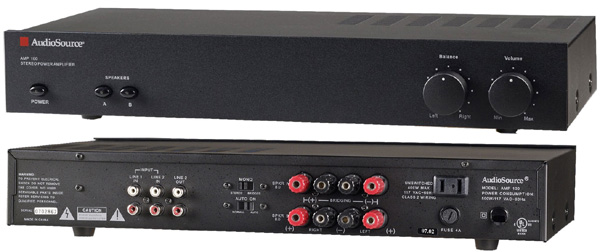
That's an AudioSource AMP-100 Stereo Power Amplifier, $103 on Amazon.
It's important to note when shopping for amplifiers that there are two different power ratings; RMS, the real amount of power, and 'peak power', the peak it can hit for a millisecond, which is basically worthless. If you search around Amazon for "speaker amplifier", you'll see a number of ads for a cheaper brand called 'Pyle', which cheats by advertising the peak power. Their "100-watt" unit is actually 10 watts of RMS power — which isn't much more than the computer has. So you have to be careful differentiating between the two. The AudioSource unit, above, is 100 watts RMS, or 50 watts a channel.
The speakers, themselves, also make a difference. Some older 4'-high monsters might not be near as 'efficient' as a smaller, newer 'bookshelf' model, and are going to require more power to get them to a loud level without distortion.
Along the same lines, how loud you plan on playing them enters the picture. For just your average speaker played at an average room level, 100 watts should be fine, but if you're planning on cranking them up, you'd better think in terms of 200 watts or higher. That'll also require much bigger bucks.
In all honesty, I can't officially recommend any brand over another, simply because I haven't bought one of these in decades, but the above info should get you going if you want to search around, and don't forget the user reviews at the bottom of the page.
And speaking of user reviews, there's an important point to be made if you're buying the above unit. Apparently, the 'Line 1' input has some kind of goofy feature that automatically mutes the volume if it doesn't sense any input, so use 'Line 2', which operates normally. The user reviews loved the unit but hated that feature, with a number of them bitching and moaning because they hadn't bothered to read the manual and thus didn't know that 'Line 2' doesn't use the feature.
The one other piece of equipment you'll need is this rascal:
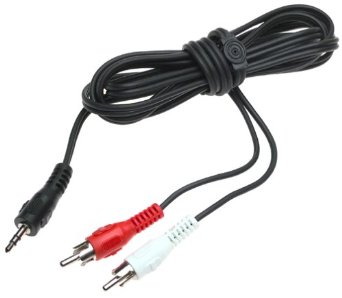
The stereo 'mini-pin' plug on the left goes into the 'Audio Out' jack on the back of the tower and the two 'RCA cup jacks' plug into the back of the amp. Hook the speakers up to the amp and you should be good to go.
Update: Reader 'rhhardin' suggested a Radio Shack Ground Loop Isolator, so keep that in mind if you get any humming out of the speakers. It sometimes occurs when two power supplies are involved, in this case the computer and the amp.
As for there being four speaker jacks, while you could probably play four smallish bookshelf speakers at a normal volume without distortion, I wouldn't plan on anything bigger. If you don't mind snipping off the jacks of your existing computer speakers, you could wire them into the 'Speaker A' slot and put the room speakers on 'B', then switch back and forth as needs be.
Wednesday, September 11. 2013
 Let's all sing along! Let's all sing along!
♪ Oh, say can you see,
by the dawn's early light... ♫
While I don't think any of these would fall under the heading of 'earthshakingly critical', there might be the odd occasion, like the above, where it would be fun to throw one or two into a comment or email.
For standard special fonts (is that an oxymoron?), like é con acento or the tilde in señor, they're all right there on the top panel of the Character Map program, found in Start Menu, Programs, Accessories, System Tools. First select 'Arial' at the top, double-click on the character you want, hit the 'Copy' button to copy it to memory, then hit Ctrl-V to paste it into the editor.
And you have zee perfect résumé!
Pic: Sorry, the artist screwed up. He thought I said special founts.
There are, however, a handful of oddball fonts that only reside in some offbeat font set or in only one common set in an odd place on the panel. The hitch is that we only have the default Windows fonts to work with, which basically means Arial, Verdana, Tahoma and Times New Roman. If you use a special font from a different font set and the reader doesn't have that particular font on their system, it won't be displayed.
B → R B □!
Be there or be square!
The adventure continues below the fold.
Continue reading "Doc's Computin' Tips: Special fonts"
Tuesday, September 10. 2013
 Kim Komando was one of the first online gurus. While she's a little too theoretical and not enough 'in the trenches' for my tastes, she's still much smarter than the average online "computer expert", like all those bozos who declared Windows Vista to be "bloated". For those of us who actually are down here in the trenches, we know that by simply turning off a few pesky background programs magically transformed the "bloated" Vista into a smooth, quick, quite stable operating system. Kim Komando was one of the first online gurus. While she's a little too theoretical and not enough 'in the trenches' for my tastes, she's still much smarter than the average online "computer expert", like all those bozos who declared Windows Vista to be "bloated". For those of us who actually are down here in the trenches, we know that by simply turning off a few pesky background programs magically transformed the "bloated" Vista into a smooth, quick, quite stable operating system.
Kim recently came out with an article titled 5 Bad Tech Habits -- And How To Break Them, so I thought I'd skim through the piece and toss in a few tidbits. She's right on all of them, but some need a bit of elaboration or clarification. I suggest you read the article first.
From the top:
1. Forgetting to clean
So, clean your tech gear as often as you'd clean any other germ or bacteria magnet. Keep some tech-friendly antiseptic wipes near your computer and phone charger.
She's 100% correct about using some kind of handy-wipe for anything with buttons on it, like a phone or keyboard. You get the the littlest bit of something like 409 under the buttons or keys and it'll turn into a thick sludge over time. I spray 409 onto a paper towel for the chore, but you have to be careful not to use too much.
As for maintaining a clean keyboard, I adhere to a rule I've been using almost from the beginning. If I get up and actually do anything, like step outside and touch something or lift up a box or whatever, I give my hands a quick rinse before returning to the computer. I'm not trying to be antiseptic; just knock off whatever's on the surface.
We'll dive below the fold for the rest.
Continue reading "Doc's Computin' Tips: Bad tech habits"
Friday, September 6. 2013
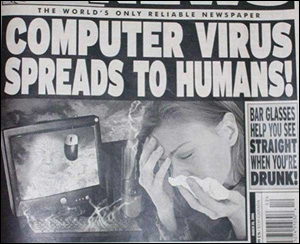 We haven't discussed computer security in a while, so let's hop through a few things. We haven't discussed computer security in a while, so let's hop through a few things.
As for an anti-malware program, I'm still a fan of the Zone Alarm Internet Security Suite, although it appears from a few reviews I read the other day that there are a number of quality programs out there these days, so there doesn't really appear to be a 'best'.
As for the freebie programs, like AVG and Avast, I'd be worried that it'd turn into a case of 'you get what you pay for'. As far as I can tell, while they get high marks for anti-malware prevention, they don't monitor browser activity in real-time. It should be noted that hackers are so smart these days that you don't actually have to click on a box to get infected. Just visiting the site will do it. So, real-time browser monitoring seems important. Using a freebie also raises the question, if you aren't going to spend computer money on a quality anti-malware program, just what are you going to spend it on?
The biggest problem with the new wave of 'smart' viruses is that, should they manage to slip by your present program and infect your system, they won't allow any other anti-malware programs to be installed. I've seen two computers with the problem in the last few years, both not allowing either Zone Alarm or Norton Anti-Virus to be installed.
For that problem, it appears the best program out there at the moment is Malwarebytes, which should install and hopefully find that bad boy. It's only hitch is that it deems every non-officially-sanctioned program a threat, including patches and 'keygen' programs, so be careful that it doesn't remove anything legitimate. It's not a real-time anti-malware program, just a file scanner.
And on a few different subjects:
Gamers
Company to pay refunds over fake alerts in 'Angry Birds'
Car Hacking
Hackers Reveal Nasty New Car Attacks--With Me Behind The Wheel
Hackers plan to offer blueprint for taking over Prius, Escape
Hacking cars isn't a problem yet, but we're getting there
Cellphones
How Do Cell Phones Reveal Your Location?
Here’s how phone metadata can reveal your affairs, abortions, and other secrets
Security issues, cell phone pics and what they can reveal
Internet
Malicious software pretends to be your friend, hijacks your Facebook account
Think Twice Before You Save Passwords in Your Chrome Browser
iPatched campaign helps users protect webcams from Internet spies
When it comes to browsing, Rule #1 is that you never, ever click on a pop-out box on a web site unless you're 1,000% sure it's legitimate. I was on Fark.com the other day and one of those "Your system might be infected! Click HERE to get a FREE SCAN of your system!" boxes popped up when I went to the 'Video' section. Now, maybe it was an earnest attempt to keep my system as clean as possible and Fark was only thinking of bettering humanity — or the whole site's run by a bunch of doofuses and some hacker snuck in overnight.
The two most common 'messages' in the boxes these days are the "Might be infected!" variety and either a Flash or Java 'You need to update!' box. Avoid both at all costs.
On the subject, here's a question for you. Let's say you're a clever hacker and you put two buttons on the box, "OK" and "CANCEL". Wouldn't you make them both install your nastyware on their systems?
Now what about that little 'close' box on the upper-right of the box? If you were a clever hacker, wouldn't you make that also do the dirty deed?
When that box popped up on Fark the other day, I immediately hit Ctrl-Alt-Delete, opened Task Manager, right-clicked on the browser's entry on the first panel and selected 'End Task'. That closed down both the browser and the 'warning' box without clicking anything on the site. That's the proper way to avoid such intrusions.
Any questions, give a holler in the comments.
Thursday, September 5. 2013
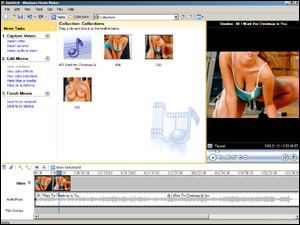 Pic: Famed videophile Dr. Mercury utilizes over a decade's worth of clinical expertise as he carefully crafts together today's serious piece of work. Pic: Famed videophile Dr. Mercury utilizes over a decade's worth of clinical expertise as he carefully crafts together today's serious piece of work.
If you happened to catch my Dixie Lily video post a while back, whoever put the clip together did a superb job of matching up the accompanying pics with the song's lyrics.
Using the free Windows program 'Movie Maker', this is fairly easy to do and obviously (glancing at pic) a barrel of fun. As long as you've got the song, the rest is up to Google Images.
For the long, arduous process (1. Load pic 2. Drag pic to timeline), we shall dip below the fold.
Continue reading "Making a music slideshow"
Tuesday, August 13. 2013
 The votes are in, the die is cast, the line's been drawn, the ball's in play and the table is set. The votes are in, the die is cast, the line's been drawn, the ball's in play and the table is set.
Thanks to commenter Walt Moffett, it appears a free player called VLC is the ticket to watching video on a Mac. An upgrade to VLC provides two key things:
— Stock programs that come with an OS are traditionally fairly featureless. In the world of Windows, the Paint program would be considered a very basic picture editor, Wordpad a very basic word processing program, and Media Player a very basic multimedia player. I don't know what the Mac equivalents are, but assuming its version of Quicktime is the same as I have on my PC, it leaves a lot to be desired. When it comes to features and overall handling, a program like VLC is a big step up.
As an example of 'handling', if you want to pause a video in Media Player using the keyboard, you have to use both hands to hit Ctrl-P, which isn't so easy to do in a darkened room. With the program I use, Media Player Classic, you slap the space bar. VLC is the same.
As an example of 'features', if I want to save a particular spot using Media Player Classic as a picture, I pause the video and select 'Save Image' from the menu. Neither Quicktime or Media Player have this option. VLC does.
— As I noted yesterday, a stock Mac can't play the proprietary Windows format Windows Media Video (WMV), and a PC can't play the proprietary Apple format Quicktime (QT). And neither can play a few 'exotic' formats such as Flash (FLV), RealMedia (RM), not to mention SWF, OGM, MKV, TS and VOB, all of which are video formats currently in use on the Internet today, either playable or downloadable.
The hitch is, while both machines are capable of playing FLV vids like on YouTube just fine, because they're providing the player, if you download the vid to your machine using a Firefox plugin, you're out of luck unless you upgrade the player.
So, because it offers better handling, more features and accepts far more video formats, VLC is a smart move up. VideoLAN, the company, has been around since I was a video god in the late 90's and early 00's and VLC has always had it share of devotees, like the way I've always favored Media Player Classic.
The free download is here. If you're on a Windows machine and want to upgrade your player, I recommend this.
My question for the group is, does installing just the player also take care of the browser, or does the 'Web plugin' also have to be installed? And is this true for both Safari and Firefox?
If you want to give it a go, first download and install the player, then try out the test link below. If it doesn't work, install the plugin, try again, then let me know the scoop in the comments.
If you have both browsers, give them both a shot. It might be that Mac treats them differently, since Safari is in-house, or it might be that Firefox already has the proper 'MIME type' since it's not restricted by Mac standards and is just awaiting a player it can access.
This is a clip from the fun Bruce Willis movie The Fifth Element. It's in my art gallery's Bag O' Clips area under "Great One-Liners". Double-click on the player after the clip starts to expand it to full-screen size.
Take it away, Bruce!
Once we get the plugin question answered, and assuming there aren't any unforeseen problems, I'll then write an 'official' Computin' Tip which I'll then link to in future posts, slap on the main Computin' Tips index and the Bag O' Clips page. And t'anks for the continuing help. We'll get this rascal nailed down.
Monday, August 12. 2013
Someone once mentioned in the comments that there was some free plugin or add-on for Macs that would allow them to view streaming WMV video files, which is a Windows format that's not playable on a stock Mac.
Similarly, a stock Windows machine can't play the Apple streaming format, Quicktime. Two decades on and these two behemoths never have resolved the issue.
Result? Adobe stepped in with its cross-platform Flash format and today both Quicktime and WMV have been relegated to the dust bin of history.
You snooze, you lose.
There are, however, still a bunch of excellent WMV vids out there, so if anyone has the answer to this ancient riddle, please let me know in the comments. I'll then do a fresh post with your name in lights (unless you decline because of shyness or fear of how it might be interpreted if it shows up on your résumé) and we'll have others download & test it, just to make sure it's OS-friendly.
If you're looking for test clips, all of the vids in the Bag O' Clips area of my Art Gallery are in WMV format due to quality issues. Pound for pound, bitrate for bandwidth, WMV is much better than the Flash format, FLV. All the rest of the site's clips are in FLV format, but I wanted to keep that area special.
T'anks for any help.
Monday, August 5. 2013
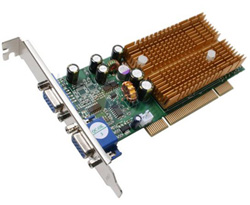 A couple of people asked in my recent barrage of 'NCIS' posts how to port the videos to their TV, and since Google has just broken new ground in the area, I thought I'd slap together an overview. A couple of people asked in my recent barrage of 'NCIS' posts how to port the videos to their TV, and since Google has just broken new ground in the area, I thought I'd slap together an overview.
There are a number of factors in play; price, difficulty/ease of setup, difficulty/ease of use, software features, extra goodies like a remote, and location of the computer & TV.
Probably the main factor is the location of the two units. The flat-out easiest routine is to just run video and audio cables directly to the TV or controller box, with the only inconvenience being that you'd have to dash back to the computer to start, end or pause a clip. But if you're just playing one long movie, no big deal.
Despite the way you're sitting there on the edge of your seat in vibrant anticipation of what's coming next, it's probably best we dip below the fold for the remainder. There are some technical terms coming up and we wouldn't want to unsettle the children.
The picture's probably scary enough.
Continue reading "Doc's Computin' Tips: From the 'puter to the TV"
Tuesday, May 28. 2013
 Many people will boycott a movie with a certain actor or actress in it who's spouted off on some goofy liberal cause, one that really touched a nerve. Many people will boycott a movie with a certain actor or actress in it who's spouted off on some goofy liberal cause, one that really touched a nerve.
I'm not one of those.
Similarly, I could give a hoot about a company's politics, as long as it has the program or web page or info I'm looking for.
Google is a perfect example of this. Politically, it's firmly in the liberal camp, but some of its programs are so good there's not even a second place.
Update: One of Google's main liberal offenses, not displaying a custom 'doodle' on their page on Memorial Day, has finally been resolved (see 'This day in history' post, below) and when a company displays such a magnificent tribute to our fallen soldiers as they did yesterday, well, I'd say all is forgiven.
Here's a roundup of the Google programs I use:
Google Search
Given that there are currently something like 18.7 billion web sites out there, there are a handful of tricks you can employ to narrow down the search:
— Putting the searched-for item in quotes tells Google to only display pages with that exact phrase.
— Putting a plus sign directly in front of a word (no space between) tells Google that the word has to actually be on the web page, not just part of some 10,000-word keyword file.
— Putting a minus sign directly in front of a keyword will not display any page with that word on it. This is a particularly effective trick as you 'minus out' all of the web sites popping up with a different theme or subject than the one you're interested in.
— If you know which site the item you're looking for is on, use this format:
site:www.domain.com keyword keyword
I've tried the other search engines, like Bing, Duck Duck Go, Ixquick, Shodan and Yandex, but I keep coming back to Google.
But that's in great part because of...
Continue reading "Doc's Computin' Tips: Google programs intro, tips & tricks"
Friday, April 26. 2013
 When it comes to running programs, it really doesn't matter how many other programs you have on your computer. Normal programs are 'static', just sitting there awaiting the call, and when you fire up a program, those are the only files being read. When it comes to running programs, it really doesn't matter how many other programs you have on your computer. Normal programs are 'static', just sitting there awaiting the call, and when you fire up a program, those are the only files being read.
It can, however, make a big difference on a few other levels, like running a virus scan, a fix-it program, or making an image file backup of the whole C Drive. More files means more time to scan, fix or copy. And since we're talking about files that might be multiple gigs in size, this is the real deal.
I've covered a couple of these in the past, but only in regards to a related subject. This time we'll look specifically at reducing the size of the C Drive.
There are five main areas of concern:
1. Getting rid of the 2 gigs of unnecessary backup files Windows 7 left after doing its big 'Service Pack' update
2. Getting rid of the 2-gig 'Hibernation' file
3. Getting rid of the 4-gig 'pagefile'
4. Cleaning out the 'Temp' folder
5. Scanning the drive for any large 'temp' files a program might have left
We shall pull out our #10 scalpel below the fold. Or blowtorch, if necessary.
Continue reading "Doc's Computin' Tips: Freeing up hard drive space"
Thursday, April 25. 2013
Update: I'm up in Homestead at the moment taking care of a computer meltdown at a business ($$), then, as long as I'm this far north, I'm planning on heading up to Miami Beach for a few days to visit a friend, so I'll postpone those two big pieces I've mentioned until next week.
In the meantime...
First, when I'm wrong about something, I admit it. That's how we grow.
As it turns out, I was wrong about the new Internet Exploder version 10. Wrong! Wrong! Wrong!
They did make an improvement.
Now, in my defense, I should note that they haven't made an actual, visible improvement in over a decade, so I admit I wasn't specifically looking for one, slacker that I am.
It now has a spell-checker. A real, live spell-checker, utilizing the latest modern software innovations, direct from the late 80's when the first spell-checker hit the scene. The fact that IE now utilizes this valuable late-80's technology speaks highly of the programming team.
Quickly going the other direction is Firefox. They've changed how the download box works and it's now a minor pain. Normally, it's an independent box, so you can do whatever you want with the browser, including closing it, and the downloads keep to themselves. This is also how IE does it.
It's now part of the actual browser, and if you click elsewhere, it disappears. And it's even more confusing with multiple windows and downloads going, so the whole thing comes across as kinda dumb.
The trick is to hit Ctrl-J, which will open the old independent downloads box. ('J' for 'Just the box') You can also open it from the Tools menu or the 'Download' button, 'Show all downloads'. They've eliminated the 'Pause' button for no known reason, but you can still pause the download by right-clicking on it. And, best, it means we don't have to worry about keeping browser windows open or not.
Dear Firefox:
It only took four of us, but we finally figured out how to use your new update correctly. Yippee for us!
It's come to this.
Monday, April 15. 2013
 This concerns (yet another case in an endless string of) Firefox & Flash not playing nicely together. Personally, I have no preference between Firefox and Internet Explorer when it comes to normal browsing, but if one does much online editing, Firefox is the way to go on a handful of levels. This concerns (yet another case in an endless string of) Firefox & Flash not playing nicely together. Personally, I have no preference between Firefox and Internet Explorer when it comes to normal browsing, but if one does much online editing, Firefox is the way to go on a handful of levels.
The problems (videos not playing, freezing up the system, strange error messages, etc) started almost a year ago when Flash introduced some new security protocol. As a bit of background: Java, which was the Flash of its day before Shockwave/Flash came along, is so riddled with exploitable holes that the most recent advice from the experts has been to disable it completely. With Java fading and Flash coming into its own, the malware hackers have pulled out their 3000X electronic microscopes in an effort to find any weaknesses. So Flash can't be blamed for battening down the hatches.
Another pesky problem that's cropped up is Firefox opening new windows under the present window, not on top of, when clicking on certain links (in the WordPress editor, e.g.) or using the right mouse button on a link to open it in a new window. This is pretty common on sites like Hot Air, Instapundit, PJ Media, Drudge, etc, that don't automatically open external links in a new window, as they should. The reason they don't is because they want you to hit that 'Back' button to get back to their site, which adds another 'click' to their total which means they can charge more for their banner advertisements.
But I stray.
To fix this pesky problem:
— On a standard 32-bit Windows system, open 'Computer', then the C Drive, then Windows\System32\Macromed\Flash
— On a 64-bit Windows system, open C:\Windows\SysWOW64\Macromed\Flash
— Edit the "mss.cfg" file with Notepad. Add this line to the bottom:
ProtectedMode=0
Save the file, reboot.
Speaking of Firefox, it went through a major security update of its own recently, so unless you're sure yours is updating automatically, go to the Help menu, 'About Firefox', click the 'Update' button.
Any questions or additions, give a holler in the comments like usual.
Wednesday, March 20. 2013
It's really amazing what computer software can pull off these days. Yesterday, I posted a video that had some superb manipulation, indistinguishable from the real thing.
Today's program lets you enhance a photograph in a number of ways. You might have seen software on shows like 'NCIS' that can age a person, but this stuff takes it to the next level. Apart from making them younger or older, you can also enhance the image to show the effects of a different lifestyle, like "Weathered Sea Captain" or "Grizzled Veteran Soldier".
Wishing to give it a spin, I jumped on the web and grabbed the first facial pic I saw, one of President Barack Obama. I checked both the "Mad Max From Thunderdome" and "Aging Battle-Hardened Warrior" boxes, and this is what it produced:

You have to admit, Obama looks friggin' awesome. If I'm going to pit someone against the likes of bin Laden, that's the guy I want.
Yes, these new computer programs are just amazing, and I-
Oops, hold on a sec.
Sorry, wrong photograph. The above is Satan in the new History Channel series, 'The Bible'. Sorry for any confusion.
The left, of course, is up in arms because of the resemblance. It seems to me that they're asking the wrong question, though. They're asking why Satan looks like President Obama.
My question is, why does President Obama look like Satan?
Friday, January 18. 2013
Breakthroughs have recently been made in two computer areas, so I figured I'd catch y'all up to date.
First, voice recognition, which I've been following for decades. One of my pet fantasies is to run a business converting everything in a client's home to voice operation.
"Dim the lights, Hal."
"Yes, master."
"A little more."
"Yes, my lord."
I'd actually program some 'character' into it, like every 23rd time you tell it to dim the lights, it makes you say 'please' first. If anyone out there has some moolah and thinks this would be a fun business venture, let's do it.
But I stray.
While Google might be a little unethical and/or greedy in certain areas, it also remains a fact that Google Maps blew the doors off MapQuest, Google Translator blew the doors off every translation program in existence, Google, itself, blew the doors off the other search engines of the day, and nothing even compares to Google Earth, Google Images and Google Street View.
I feel they mightily dropped the ball with their Chrome browser, though, since it's only the ugliest, most ill-equipped browser in history. You can't even load a local page into it, last time I checked. But eventually they should get things sorted out (it says here).
It does, however, now incorporate what appears to be a quantum leap in voice recognition. If you've ever wasted hours upon hours on programs like 'Dragon Naturally Speaking', then you'll see what I mean.
Although it's a brief video, it still provides three key moments. Note (1) how it capitalizes the first word of the line after he says "New paragraph", (2) how it first thinks he says "notes", then changes it to "no" when "notes" doesn't make sense in context, and how it converts the word "exclamation" into an exclamation mark after it hears the whole phrase. Very smart.
As a small aside, that's not quite the truth up above. It's not Chrome, the browser, that's doing this, but an add-on program. We'll most likely see a conversion of the add-on for IE and FF soon enough. Google's just saying that to fluff Chrome's feathers. Next up is controlling a computer with just one's hands. Below the fold we'll examine a 'magic box' called Leap Motion. As these things go, it's pretty amazing. Whether or not it's practical is the question at hand — both literally and figuratively.
Continue reading "On the digital front"
Wednesday, January 16. 2013
This came up the other day when I took the 64-bit version of Firefox out for a spin. Although it's basically the same program, they decided to rename it 'Nightly' and change the cute Firefox icons from this...

...to this wretched abomination:

This begs the question, why didn't they just rename it 'Bowling Ball'?
Using a free program called Resource Hacker, it's easy to change an ugly icon to something better. We shall delve into these digital wonders below the fold.
Continue reading "Doc's Computin' Tips: Changing a program's icon"
Tuesday, January 15. 2013
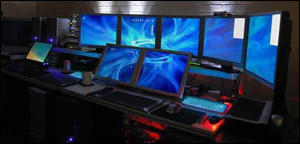 Pic: Finally! A computer system for people with 14 eyes!
Just to cover a few recent things that have popped up in my geeky little world:
Flash 64-bit Probs
I prefer using a 64-bit Windows system because it utilizes more of my machine's memory. The problem is that Flash, which until recently had a specific 64-bit version that worked just fine, now has a 'multi-system' version which doesn't. I've had various odd problems with both Internet Exploder and Firefox. If you're running a 64-bit system and having Flash probs, the best troubleshooting page I've come across is here. I think both #6 & 7 helped on this end.
Firefox 64-bit Probs
I'd never heard of a 64-bit Firefox, but I got to thinking about it, punched it into Google, and I'll be double-dipped if not only is there a 64-bit version, but that Mozilla officially killed it at one point — which naturally raised a huge outcry among its users and they brought it back. The sordid details are here. The 'official' release is still their multi-platform model; the 64-bit version is here if you want to give it a spin. Be forewarned that they not only changed the name from Firefox to 'Nightly', but changed the icon to something really horrid. The latter can be easily remedied; I'll have a post on changing the icon of an executable tomorrow. Note that you'll need the original EXE file for the original icon.
Upgrading To Windows 8
Some sobering thoughts here.
Domain Names
I've found over the years that I have two soap boxes I occasionally like clambering back on; system backup and getting your yourname.com domain before anyone else does. You only get one shot at it.
Gosh, if only them Congresscritters read Maggie's Farm, huh?
Pro-Israel Group Buys ChuckHagel.com to Fight Hagel's Nomination
Gun Parts Store Registers Sen. Feinstein's Domain Name, Uses it to Promote Gun Rights
Live and learn, guys. More info on firing up your own domain here.
Security
You might have seen the plethora of articles this past week on temporarily disabling Java. Java is a 'helper' program for browsers (on every operating system, Mac and Linux users please note) so certain functions on a web site will work. It's also used widely by hackers to install malware on your system, and there's a whole new raft of bad stuff coming down the pike, hence the official alert to disable it.
Oracle, the home company, has just now released an update and it's strongly suggested you download & install it. The download site is here. Click the 'Download' button under 'JDK', click the 'Accept license' gadget, then the version for your particular system. Regular 32-bit Windows systems are 'Windows x86'.
I should note that some people think Java is so vulnerable that it should be re-written from the ground up — if not abandoned by web sites entirely — and they recommend you just flat-out disable it. Instructions are here; it's usually just the unchecking of a box. Speaking as a webmaster, I would note that Java isn't used very much these days and you probably won't notice a thing. If you were on some site which had a function you very much wanted to use but were getting a 'You need Java installed' message, you could always just flip it back on for a bit.
Any feedback or questions, give a holler in the comments like usual.
Saturday, January 5. 2013
 Feel like a fun research project? This actually might end up being a fairly informative endeavor, not to mention elusive and challenging. Feel like a fun research project? This actually might end up being a fairly informative endeavor, not to mention elusive and challenging.
As far as I've seen, the best Google Earth site out there is my Google Earth Project. Nothing else even compares.
The video tours are divided into categories, such as "Animals", "Designs", "Geometric", "Ancient UFO Landing Sites", etc. The usual stuff Google Earth stuff, in other words.
On each tour's database page is a small pic of each site, its GoogleMaps and Google Earth link, and the GPS coordinates. Some of the entries have a 'More Info' link which leads to an article on that particular odd/strange/bizarre/probably-alien location.
That's where you come in. The 'more info' part, I mean, not the bizarre alien part — although I'm willing to make exceptions.
If you want to test your search skills and contribute to this fun project, the basic premise is simple. Find an odd/strange/bizarre/proof-that-aliens-once-visited-us spot and dig up the background info on it. Somewhere out there, somebody knows what's going on and has written about it — probably in Chinese or Norwegian — so finding it is the goal. Leave the name of the location and the 'More Info' link in the comments and I'll have it on the site within minutes.
If we get enough entries, I'll collate the best of them, include small pics with the links and make a whole post out of it.
Below the fold I'll lay out some search tips, and thanks from both me and any future viewers of the site. A gal from the Google Personnel department emailed me about a year ago and said they all loved it.
Continue reading "Google Earth project time"
Thursday, January 3. 2013
As a small side note, if you've been thinking about checking out the great Google Earth program, do so now. This Saturday we're going to hold a little GE 'easter egg hunt' which should be both informative and fun. It should, in turn, spawn an interesting post of the collected results. If you want to join in, it'll be helpful if you already know how to use this most intriguing of programs.
 I'm surprised I haven't blundered across this before now, but check out this cool Firefox update page. I needed pretty much everything on the list. I'm surprised I haven't blundered across this before now, but check out this cool Firefox update page. I needed pretty much everything on the list.
Along with Adobe Reader for PDF files and the ubiquitous Flash, I recommend the QuickTime plugin for the occasional QT video and Java for older sites that are using Java instead of Flash for various special effects.
As far as Firefox's various problems with Flash, it appears some of it's been ironed out recently. Both have come out with updates since my post on it a month ago and I haven't seen any snags since then. If you've been having problems, I suggest running the Flash uninstall program before updating.
On the subject, the other common Flash problem is running into a 'Currently unavailable' message when trying to play a YouTube video either from the main site or from a page with an embedded YouTube video. This is YouTube making a little experiment with selected members using a new viewing protocol called 'HTML5', and apparently they don't like you using that old, hackneyed Flash player on their precious videos. The solution is to go here and click on the link at the bottom to opt out of the program.
Wednesday, December 19. 2012
 Like a lot of these Tips, this might only interest a few — but it might interest them a lot. Like a lot of these Tips, this might only interest a few — but it might interest them a lot.
This will show you how to manipulate online files via a Windows icon.
For a quick example, let's say you run a blog or forum. You like the way the readers can post both pics and vids in the comments, but it worries you to allow it overnight. Some sworn enemy or evil troll might upload a bucketload of child porno at 3 AM and call the FBI. Sure, your good name will be cleared. Eventually.
So you set up a DOS batch file to perform a little online file magiculation. When you decide to call it quits for the day, you double-click on your 'Overnight' icon and it overwrites the config file for the comment editor with one that has the upload feature disabled. In the morning, when you're back in the saddle, you run the 'Normal' batch file and it overwrites the config file with the standard one.
You can also use it to automagically change themes (which changes the entire look of the site), sidebar pics, ad banners and videos, and you can include a timer in the DOS file so it'll change an item every X number of minutes or hours. You can then run that file when the computer starts up so you don't even have to think about it. All in all, a very slick little trick.
Continue reading "Doc's Computin' Tips: Controlling online files via Windows"
Friday, December 14. 2012
 This might be of interest if you're into uploading or downloading large files. In my case, I don't have a TV so I download my few weekly shows from Usenet a few days afterward. They're high-res and usually about a gig in size. Likewise, when I upload a 1-hour documentary to one of my web sites, they're also often a gig in size. Since I'm using a slow Verizon Wireless connection, this can take some serious time, like three or four hours. This might be of interest if you're into uploading or downloading large files. In my case, I don't have a TV so I download my few weekly shows from Usenet a few days afterward. They're high-res and usually about a gig in size. Likewise, when I upload a 1-hour documentary to one of my web sites, they're also often a gig in size. Since I'm using a slow Verizon Wireless connection, this can take some serious time, like three or four hours.
And during that time, because I'm doing other things on the computer, I might suddenly need to reboot. Hence the problem.
Below the fold I'll reveal what I know about continuing stopped uploads and downloads. I recently made a fascinating discovery about Firefox that I wanted to pass along. Unlike Internet Exploder, it can actually continue broken downloads, but, naturally, there's a trick to it.
Continue reading "Doc's Computin' Tips: Resuming broken uploads & downloads"
|